 how-to
How to Keep Equipment Maintenance Records Your Crew Actually Uses
Last Updated: November 8, 2026
Quick Summary
To keep maintenance records your crew actually uses, start with an asset register that gives every machine one permanent ID, then log each service, repair, and inspection against that ID using a short set of required fields. Capture entries at the machine during the repair, review them for completeness, and correct errors with dated notes instead of overwriting them.
- Assign one equipment ID per machine and use it on the register, the machine, and every record.
- Every log entry needs eight core fields, including meter reading, parts with part numbers, failure details, and downtime.
- Run each job through six steps with a named owner, from breakdown report to closed record.
- The weak point is usually the technician entry, so keep required fields short enough to finish in under two minutes.
- Move off spreadsheets when versions conflict, history is split across places, or field access fails.
Table of Contents
- Start With an Asset Register Your Crew Can Read
- What Belongs in a Complete Equipment Maintenance Log
- Building an Equipment Maintenance Log Template in Excel
- Maintenance Log Examples: A Filled-In Record and Annotated Fields
- A Field-Ready Workflow from Breakdown Report to Closed Record
- How Long Must Maintenance Records Be Retained?
- When to Move from Spreadsheets to an Equipment Maintenance App
- Keeping Records Accurate: Corrections, Audit Trails, and Data Quality
- Frequently Asked Questions
Start With an Asset Register Your Crew Can Read
Most equipment records fail before the first repair is logged. The problem is not the form. It is that nobody built a list of machines first.
An asset register is the master list of every machine the crew services. Each machine gets one line, one name, and one permanent ID.
Get this right and the rest of the system holds together.
Assign One Equipment ID per Machine
Pick a format and never change it. A simple approach works best:
- Unit number: the number already painted on the machine, if it has one
- Year and sequence: for example, EX-2026-014
- Location prefix: useful when one crew runs several yards
Write the ID on the machine, in the register, and on every record. One ID, one machine, no exceptions.
That single rule kills the most common recordkeeping failure: duplicate entries that split a repair history in two.
What Belongs in a Complete Equipment Maintenance Log
A maintenance log is the running record of every service, repair, and inspection performed on one machine. It answers three questions fast: what was done, who did it, and what it cost.
The log is only as good as its fields. Too few and the record tells you nothing. Too many and the crew stops filling it in.
The Eight Fields That Make a Record Useful
Every entry needs these, at minimum:
- Equipment ID and description
- Service date and meter reading
- Maintenance task performed
- Technician name
- Labor hours
- Parts used, with part numbers
- Failure details and root cause
- Downtime and cost
That is the core. Add photos, manuals, and warranty notes where they help.
The Springer case study on predictive maintenance implementation by Hoffmann and coauthors (2025) examines what helps and hinders maintenance programs in industrial settings. The pattern it describes is familiar: the records are only useful when the data going in is consistent.
Building an Equipment Maintenance Log Template in Excel
An equipment maintenance log template in Excel is a reasonable starting point for a small crew. It is free, familiar, and flexible.
Build it as a workbook with three tabs:
- Asset register: one row per machine, with ID, make, model, and location
- Service log: one row per maintenance task
- Parts and costs: one row per part used, linked to the service log
Lock the header row. Add a dropdown for equipment ID so nobody types it by hand. Set the date column to a fixed format.
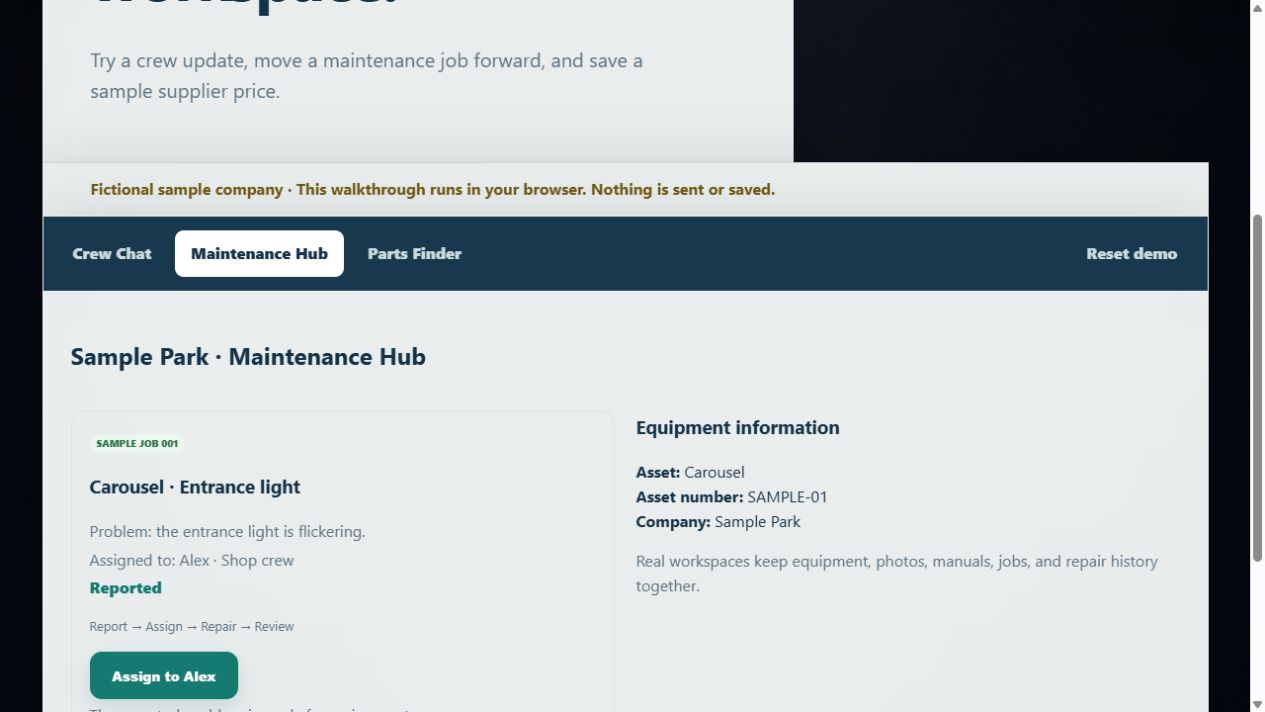
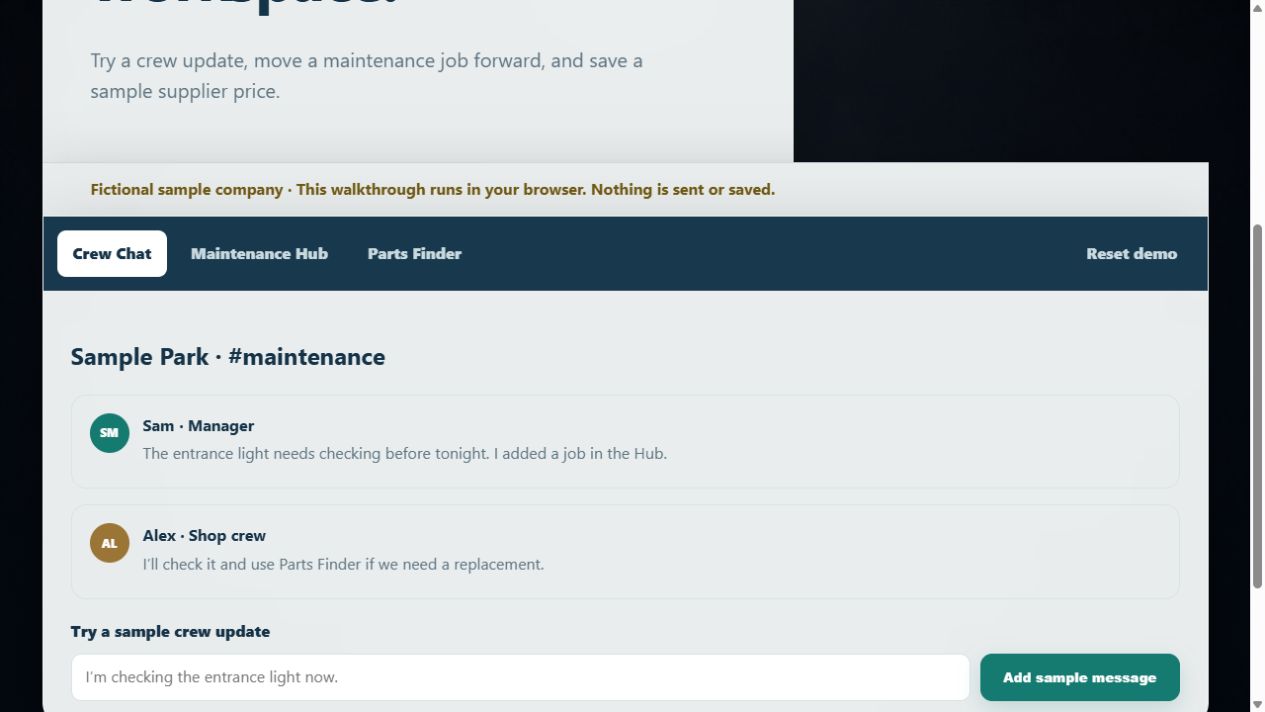
Want to see how a structured workspace handles the same records before committing to a spreadsheet? Meet your sample workspace and click through a fictional crew's maintenance data.
Watch out: Excel has no audit trail by default. Anyone can overwrite a cell and the original value is gone.
Maintenance Log Examples: A Filled-In Record and Annotated Fields
Here is a maintenance log example with each field filled in, so the crew can see what "complete" looks like.
Field | Example entry | Why it matters |
|---|---|---|
Equipment ID | EX-2026-014 | Ties the record to one machine |
Service date | 2026-10-14 | Starts the service interval clock |
Meter reading | 4,182 hours | Supports scheduled maintenance |
Task | Replace hydraulic hose, boom cylinder | Defines the work performed |
Technician | R. Alvarez | Creates accountability |
Labor hours | 2.5 | Feeds cost tracking |
Parts used | Hose assembly, part 4471-H | Links cost and warranty |
Failure details | Chafed against frame guard | Supports root cause review |
Downtime | 5 hours | Measures operational impact |
Two fields do the most work. Failure details turn a repair into a lesson. Downtime turns a lesson into a number a manager can act on.
Most logs skip both. That is why they never show a pattern.
A Field-Ready Workflow from Breakdown Report to Closed Record
The workflow matters more than the form. A record that gets filled in three days later is a guess, not a record.

Maintenance technician writing on a clipboard by shop equipment with a smartphone in a bright repair bay
Run every job through the same six steps, with a named owner for each one.
- Report (operator or any crew member). The person who notices the fault logs it immediately with the equipment ID, a short description, and a photo if possible. The report is timestamped the moment it is created. Do not wait for a lead to be available, a report that sits in someone's head until lunch is already unreliable.
- Triage and assign (lead or supervisor). A lead reviews the report, confirms the equipment ID, sets a priority, and assigns a technician. The work order is opened at this point, not after the repair. If the job is deferred, the reason is recorded so the gap is visible later.
- Repair and record on the spot (technician). The technician records labor hours, parts used with part numbers, failure details, and meter reading while the machine is still in front of them. This is the step that most often fails. A common pattern is to capture the essentials on a phone or job card during the repair and complete the narrative at the next break, before the shift ends.
- Review for completeness (supervisor). Before the work order closes, a supervisor checks that every required field is filled, that parts and hours reconcile, and that the failure description is specific enough to be useful later. A review that only checks a box does not catch missing root-cause notes.
- Correct, do not overwrite (supervisor or technician). If an entry is wrong, add a dated correction with the reason and the name of the person making it. The original entry stays visible. This is what makes the record defensible in an audit or a warranty claim.
- Close and update history (system or designated record keeper). The record locks, the machine's repair history updates, and any follow-up task, a recheck, a parts reorder, a warranty claim, is created from the same entry so nothing is lost in a separate notebook.
The weak point is almost always step three.
For crews that want guidance on that handoff, how to improve field service technician communication covers the reporting habits that keep records current.
How Long Must Maintenance Records Be Retained?
Retention periods depend on the industry, the equipment type, and the regulator. There is no single number that covers every crew, and any article that gives you one is guessing. What you can do is build a short decision checklist and document the answer for each class of record.
Start With the Record Categories You Actually Keep
Most crews keep four kinds of maintenance records, and each tends to follow a different retention logic:
- Safety-related inspections and repairs, often tied to the equipment's service life or to the interval between inspections, and usually the longest retention requirement
- Financial records behind repairs, parts, and labor, typically follow tax and accounting retention rules for your jurisdiction
- Warranty and manufacturer records, should last at least as long as the warranty term, plus a buffer for claims filed near the end
A Decision Checklist for Setting Retention
Work through these questions for each category, and write down the answer and the source:
- Which regulator or standard applies to this equipment? For workplace safety in the US, start with OSHA and your state plan. For environmental and emissions records, check the EPA and your state environmental agency. For tax-related records, check IRS guidance and your state revenue department. For equipment used in regulated industries, check the specific industry regulator.
- Does a manufacturer or warranty term set a minimum? Read the warranty document and note the term.
- Does a contract or customer requirement set a longer period? Many service contracts and insurer policies do.
- What is the longest applicable period? Set one retention period that satisfies the strictest requirement across all four categories for that equipment class.
- Who owns the policy, and when is it reviewed? Name a role, not a person, and review annually or when regulations change.
Store Records So They Survive a Software Change
Retention is only useful if the record is still readable when you need it. Export records periodically in a common format, keep a copy outside the primary system, and confirm that exported records include timestamps and the name of the person who made each entry.
Watch out: a retention policy nobody documented is not a policy. Write it down, name an owner, and review it once a year, and note that retention requirements can change, so verify against the current regulator guidance rather than relying on a number copied from an old article.
When to Move from Spreadsheets to an Equipment Maintenance App
A spreadsheet stops working when the crew stops trusting it. The usual signs:
- Two people edit the same file and one version wins
- Repair history lives in three places and none match
- Nobody can pull up a machine's history from the field
- Parts used get logged weeks late, if at all
At that point the cost of the spreadsheet is hidden in rework and repeat failures.
For a deeper look at the options, the guide to maintenance software for industrial facilities compares approaches on stated criteria. And when a crew is ready to try a records workflow instead of a file, Maintenance Hub is where work requests, equipment records, and repair history live.
Teamstead Crew is a browser-based workspace for smaller crews. Maintenance Hub handles work requests, equipment records, and repair history. Crew Chat can be used alongside it or on its own.
One thing to plan for: Teamstead Crew runs in modern browsers and needs an internet connection.
Keeping Records Accurate: Corrections, Audit Trails, and Data Quality
Accuracy is a habit, not a feature. Three practices protect it.
Correct, do not overwrite. When an entry is wrong, add a correction with the date and the reason.
Keep an audit trail. Every record should show who created it and who changed it.
A simple monthly check catches most problems:
- Every machine has at least one entry this month
- No work order is closed without parts and hours
- No duplicate equipment IDs
- Corrections are dated and explained
Keeping equipment maintenance records is not a filing job.
Get started with Teamstead Crew and give every machine a record the crew will actually keep up to date.
Frequently Asked Questions
How long must maintenance records be retained?
There is no single universal answer because retention rules vary by industry, equipment type, and jurisdiction. A practical approach is to keep records for the life of the asset plus a set period after disposal, then confirm the specific requirement with your industry regulator or legal advisor. For safety-related inspections and compliance audits, longer retention is usually safer. Store records where they can be retrieved quickly, and back up digital files so a single device failure does not erase years of service history.
What information should an equipment maintenance record include?
At minimum, capture the equipment ID, the service date, the maintenance task performed, the technician's name, labor hours, parts used, and the equipment condition at the time. Add meter readings or operating hours, failure details, and a root cause note for corrective maintenance. A work order number ties the record to the original request. The more consistently these fields are filled, the more useful the maintenance history becomes for spotting recurring failures and planning scheduled maintenance.
Should equipment maintenance records be kept digitally or on paper?
Digital records are easier to search, back up, and share across a crew, while paper logs still work for small shops with simple needs. Many maintenance managers start on paper logs, index cards, or spreadsheets and move to a digital maintenance log as the fleet grows. The deciding factor is retrieval: if you cannot find a machine's repair history in under a minute, the format is costing you time. Whichever you choose, keep a backup and a clear correction process.
How do you track equipment repair history across multiple machines?
Give every machine a unique equipment ID and record all work against that ID, not against a job or a person. A shared asset register keeps the list consistent, and each work order links back to one machine. That structure lets you pull a full service history per unit and compare maintenance costs across similar equipment. A browser-based equipment maintenance app such as Teamstead Crew's Maintenance Hub keeps equipment records, repair notes, and repair history in one workspace, which helps when several machines are in service at once.